Outlook Add-in GpgOL/Web
GnuPG Email Encryption for the New Outlook
The new generation of Outlook is built on modern web technologies. GpgOL/Web brings proven GnuPG email encryption directly into Outlook, whether you work in your browser or on Windows. All encryption and decryption happen locally—your keys never leave your device. This keeps your confidential communication private.
Important: GpgOL/Web is currently not intended for use with GnuPG VS-Desktop® and is not VS-NfD compliant. A parallel installation with GnuPG VS-Desktop® is not possible. GpgOL/Web will be available with the upcoming GnuPG VS-Desktop® 4.
Why a New GnuPG Add-in for Outlook Web?
The new Outlook
Microsoft is transitioning Outlook to a modern, web-based platform. Legacy COM add-ins—extensions for the classic desktop app—are no longer supported. To keep GnuPG email encryption running in the new Outlook, we're developing GpgOL/Web. The add-in keeps all cryptographic processing strictly separate from Outlook—encryption and decryption happen entirely on your local system. A dedicated server component handles the connection to Outlook.
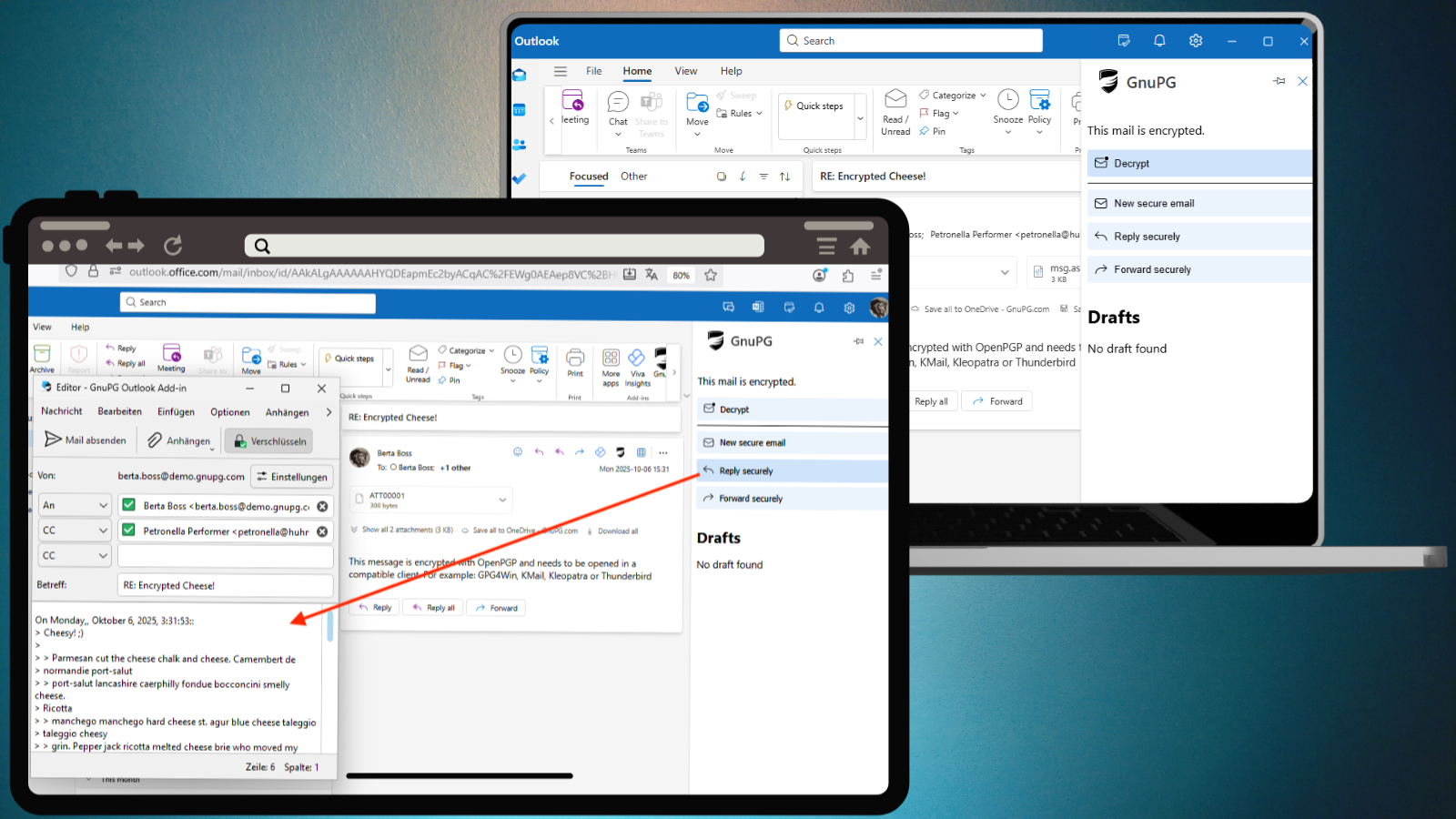
How GpgOL/Web Protects Your Communication
Send and Receive Encrypted Emails
Keep your confidential messages protected right inside Outlook. All encryption and decryption happen locally–your private keys never leave your system.
Automatically Protected When Forwarding
Forwarding emails? GpgOL/Web can automatically re-encrypt them for you. Your data stays encrypted at every step—even if a message changes mailboxes.
Re-Encrypt Entire Mail Folders
Need to hand over a mailbox or update permissions? The re-encrypt feature secures entire folders with new keys in one go, keeping all sensitive emails protected.
Simple Setup
GpgOL/Web is installed through the Outlook manifest–no complex setup required. Just activate it, and start encrypting your emails.
Architecture and Security of GpgOL/Web
GpgOL/Web is built on a modular architecture that keeps Outlook clearly separate from all cryptographic processing. This preserves GnuPG's core security principle: private keys and plaintext data never leave your local system.
The add-in consists of two components:
- GpgOL Service: The proxy service acts as an intermediary between Outlook and the local GnuPG environment. It provides the JavaScript components the Outlook add-in uses to communicate with the service, and manages all connections over local port 5656. Both HTTP and WebSocket communication run on this port, secured by a TLS certificate. Even with self-signed certificates, content remains protected by an additional layer of OpenPGP encryption.
- GpgOL Client: This component handles the actual cryptographic operations—decryption, signing, and re-encryption. The client runs locally and processes all sensitive data exclusively on your own machine. Even when opening signed or unencrypted messages, private keys remain protected at all times.
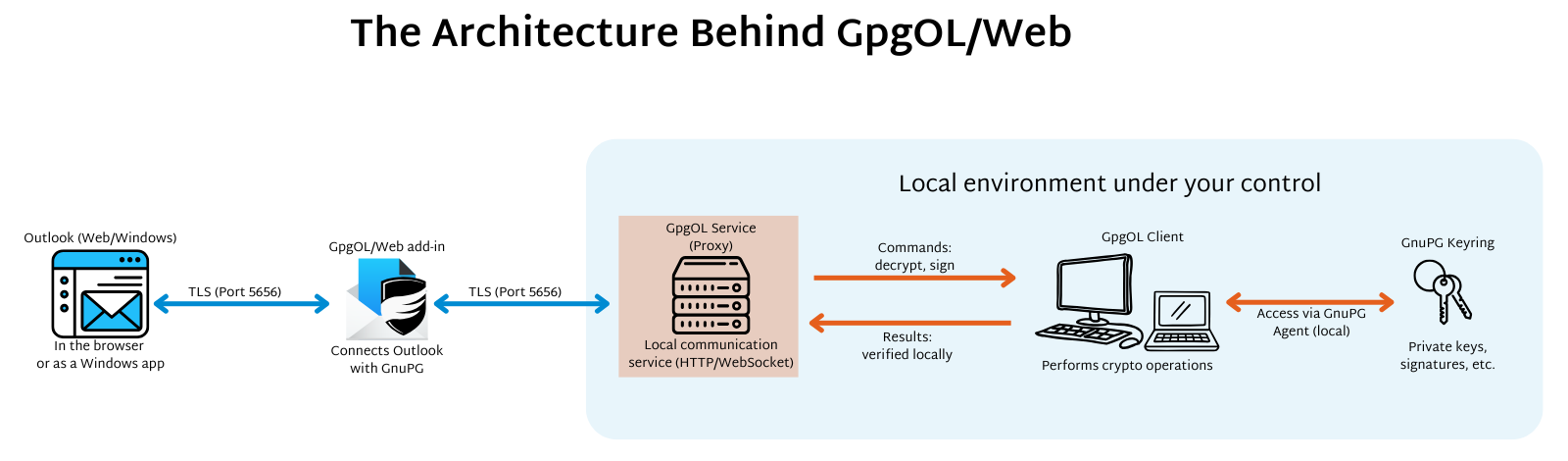
When GpgOL/Web starts, Outlook and the local client register with each other through the proxy service. Any new connection—for example, when another device tries to access the service—must be approved manually before messages can be encrypted or decrypted. This keeps full control with the users, and no unauthorized system can access sensitive data.
The communication model is also protected against external attacks:
- Rogue clients cannot register, as every connection must be explicitly verified.
- The proxy uses Cross-Origin Resource Sharing (CORS) to allow requests only from authorized Outlook web clients or the Windows web-based app. The browser recognizes legitimate calls and blocks requests from untrusted websites.
- Exchange Web Services (EWS) access is handled exclusively by the authorized GpgOL client, which manages OAuth tokens securely on the local system. The proxy acts only as a relay—without access to plaintext data.
With this combination of strict separation, local key management, and a secure proxy service, GpgOL/Web meets GnuPG's high security standards—even in web-based Outlook environments.
Try GpgOL/Web
The GpgOL/Web add-in is now available in Gpg4win 5 and GnuPG Desktop® 5, and will later become part of GnuPG VS-Desktop® 4. It cannot be used together with the current version of GnuPG VS-Desktop®.